

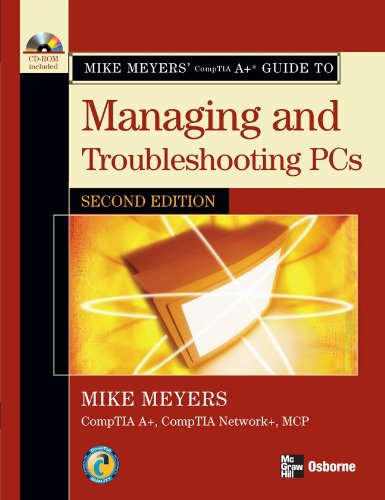
Mike Meyers A Guide to Managing and Troubleshooting PCs 2nd Edition by Michael Meyers ISBN 0072263555 9780072263558
Original price was: $50.00.$35.00Current price is: $35.00.
Mike Meyers A Guide to Managing and Troubleshooting PCs 2nd Edition by Michael Meyers – Ebook PDF Instant Download/Delivery: 0072263555, 9780072263558
Full download Mike Meyers A Guide to Managing and Troubleshooting PCs 2nd Edition after payment
Product details:
ISBN 10: 0072263555
ISBN 13: 9780072263558
Author: Michael Meyers
Mike Meyers A Guide to Managing and Troubleshooting PCs 2nd Table of contents:
1. The Path of the PC Tech
-
the importance of skill in managing and troubleshooting pcs
-
the concept of certifications
-
the importance of comptia a+ certification
-
what is comptia a+ certification?
-
who is comptia?
-
the path to other certifications
-
how do i become comptia a+ certified?
-
the basic exam structure
-
help! which exam should i take?
-
help! what chapters cover the help desk and depot technician exams?
-
how do i take the exams?
-
how much does the exam cost?
-
how to pass the comptia a+ exams
-
chapter 1 review
2. The Visible PC
-
historical/conceptual
-
how the pc works (input, processing, output, storage)
-
the art of the pc technician
-
tools of the trade and esd avoidance
-
the complete pc (external connections, devices and connectors)
-
inside the system unit (case, cpu, ram, motherboard, power supply, floppy/hard/optical drive)
-
know your parts
-
chapter 2 review
3. Microprocessors
-
historical/conceptual
-
cpu core components (registers, clock, buses, memory)
-
essentials (modern cpus, manufacturers, packages)
-
pentium-era cpus and early amd athlon
-
processing and wattage
-
installing and selecting cpus
-
the art of cooling
-
know your cpus
-
beyond a+ (overclocking)
-
chapter 3 review
4. RAM
-
historical/conceptual
-
understanding and organizing dram
-
practical dram (sticks, consumer ram)
-
essentials (ram types: sdram, rdram, ddr, ddr2)
-
working with ram (installing, troubleshooting, testing)
-
beyond a+ (future generations)
-
chapter 4 review
5. BIOS and CMOS
-
historical/conceptual
-
talking to the keyboard
-
essentials (setup program, option roms, drivers, post, beep codes, boot process)
-
care and feeding of bios/cmos (losing settings, clearing, flashing rom)
-
chapter 5 review
6. Expansion Bus
-
historical/conceptual
-
pc bus and isa
-
essentials (pci, system resources, dma)
-
installing and troubleshooting cards
-
chapter 6 review
7. Motherboards
-
historical/conceptual
-
how motherboards work (form factors, chipset, components)
-
upgrading/installing/troubleshooting
-
beyond a+ (small form factors)
-
chapter 7 review
8. Power Supplies
-
historical/conceptual
-
understanding electricity and power supply components
-
installing, maintaining, troubleshooting
-
beyond a+ (modular supplies, rail power)
-
chapter 8 review
9. Hard Drive Technologies
-
historical/conceptual
-
how drives work (encoding, geometry, arms)
-
essentials (ata versions, scsi, raid, connecting drives, bios config)
-
troubleshooting installation
-
beyond a+ (spindle speed, hybrids)
-
chapter 9 review
10. Implementing Hard Drives
-
historical/conceptual
-
partitions, disks, formatting, filesystems (fat, fat32, ntfs)
-
partitioning/formatting process & tools
-
maintaining and troubleshooting drives
-
beyond a+ (third-party tools)
-
chapter 10 review
11. Removable Media
-
historical/conceptual
-
floppy, flash memory, optical drives
-
installing and troubleshooting media
-
beyond a+ (high-definition optical)
-
chapter 11 review
12. Installing and Upgrading Windows
-
historical/conceptual
-
os functions and traits
-
preparing and performing install/upgrade (Win2K, XP)
-
troubleshooting installation problems
-
chapter 12 review
13. Understanding Windows
-
essentials (interface, utilities, organization)
-
os versions (XP, Vista, mobile, embedded)
-
boot process
-
chapter 13 review
14. Working with the Command‑Line Interface
-
historical/conceptual
-
command-line syntax and commands (dir, cd, copy, move, batch files)
-
beyond a+ (special keys, compact/cipher)
-
chapter 14 review
15. Maintaining and Troubleshooting Windows
-
essentials (updates, user accounts, disk tools, security, optimization)
-
troubleshooting windows issues
-
chapter 15 review
16. Input/Output
-
essentials (ports: serial, usb, firewire; devices: keyboards, scanners, cameras, biometrics)
-
chapter 16 review
17. Video
-
historical/conceptual
-
displays (crt, lcd, projectors), video cards, monitors
-
installing/configuring/troubleshooting video
-
beyond a+ (SLI, crossfire, TV, etc.)
-
chapter 17 review
18. Sound
-
historical/conceptual
-
audio formats, midi, streaming
-
installing sound cards/drivers/apps
-
troubleshooting audio issues
-
beyond a+ (benchmarking)
-
chapter 18 review
19. Portable Computing
-
essentials (device types, ports, pc cards)
-
maintaining portable pcs (batteries, power, cleaning)
-
troubleshooting and future tech (centrino, ultra-mobile)
-
chapter 19 review
20. Printers
-
essentials (printer types: impact, inkjet, laser, etc.)
-
process, installation, optimization, troubleshooting
-
beyond a+ (dot4)
-
chapter 20 review
21. Local Area Networking
-
historical/conceptual
-
network technologies (ethernet, token ring, usb, wireless)
-
installing/configuring wired/wireless networks
-
troubleshooting networks (osi model, protocols)
-
chapter 21 review
22. The Internet
-
historical/conceptual
-
how internet works (isp tiers, tcp/ip)
-
connection types (dial-up, dsl, cable, lan, sat, wireless)
-
internet tools (web, email, ftp, voip, gaming, chat)
-
chapter 22 review
23. Computer Security
-
analyzing threats (unauthorized access, virus, crash)
-
essentials (backups, social engineering, firewalls, encryption)
-
beyond a+ (vista security)
-
chapter 23 review
24. The Complete PC Tech
-
essentials (how computers work, troubleshooting, customer handling, communication, toolkit, backup steps)
-
chapter 24 review
People also search for Mike Meyers A Guide to Managing and Troubleshooting PCs 2nd:
mike meyers comptia a+ guide to managing and troubleshooting pcs
mike meyers managing and troubleshooting pcs
mike meyers’ comptia a+ guide to managing and troubleshooting pcs
haas troubleshooting guide
7 step troubleshooting process navy
Tags: Michael Meyers, Troubleshooting, PCs